All topics related to blockhosts
Articles
Software - Sub Categories
Spam taking up most of the Internet bandwidth?
Mon, 2013–Jan–07Is spam taking up a lot of both the network as well as CPU bandwidth on the Internet?
Spam is not just email, it also comes in another form - spam comments on websites. A large number of machines seem engineered to attack any website that allows for user comments. aczoom.com is a low volume personal site, so it was a shock to see the monthly bandwidth go up from the usual 2-3G per month to over 9G/month. Investigating this led to the conclusion that is is mostly comment spam activity, and most of it coming from machines in China.
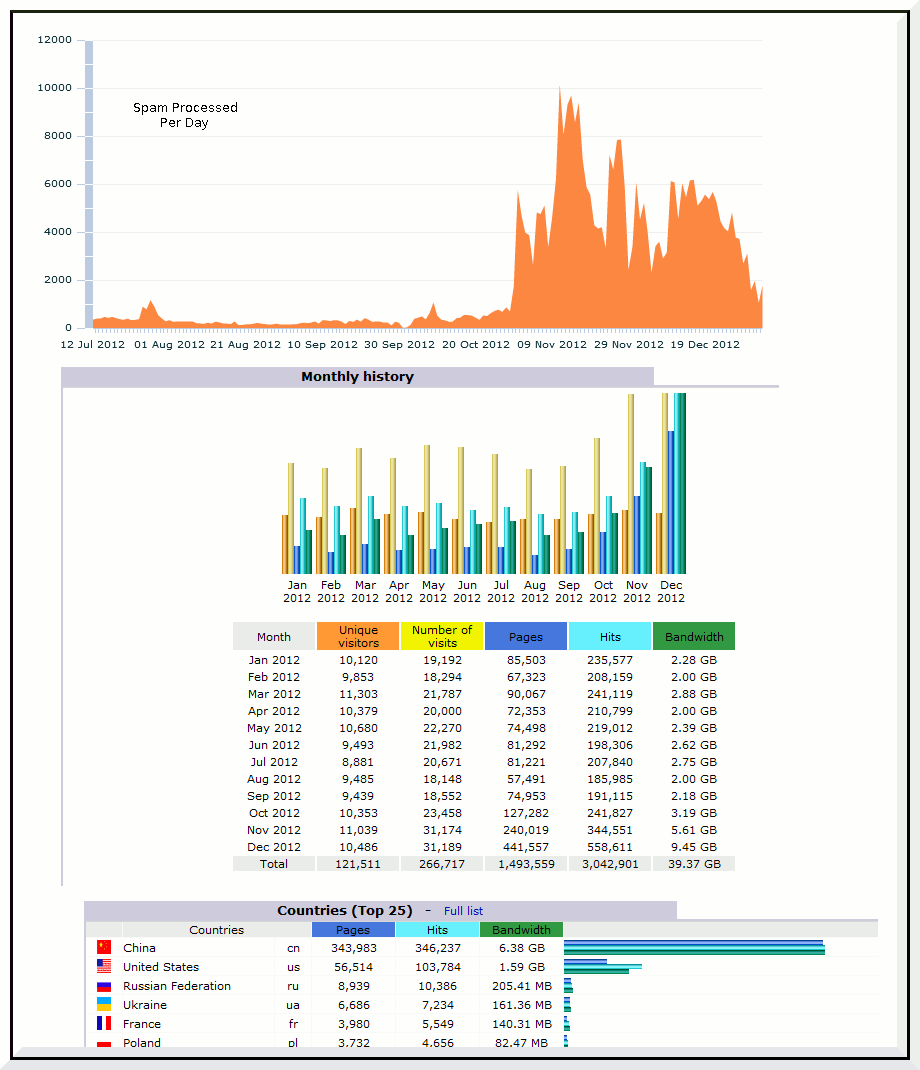
The attached image (click on image for full size) shows the huge increase in spam processing. This may not have been a problem, but it also causes a huge increase in the system load. Over this same period, IP addresses from China accounted for 67% of total traffic, and over 6G of network traffic. I very seriously doubt people in China have any interest in any part of this aczoom.com site.
Here's a table that shows data from the AWstats and spam logging programs:
| / | Before Nov 2012 | As of Nov 2012 | Change due to Spam |
|---|---|---|---|
| Bandwidth Used | 2.2 GB/month | 9.4 GB/month | 4x |
| Spam Comments Attempted (average) |
500 / day | 5000 / day | 10x |
| Spam Comments Attempted (peak) |
1,000 / day | 10,000 / day | 10x |
| Bandwitdh used by IP addresses from China |
0.3 GB/month | 6.3 GB/month | 20x |
Google Chromebook tips
Mon, 2012–Dec–24[Updated after a week - Chromebook is actually a pain to use, not yet ready for prime time. Fine if you are always online, even then, user experience is not smooth. There are just too many bugs - which means that they will be fixed in due time, but the existence of such basic problems makes it hard to recommend Chrome to everyone at this time. Worse - its offline mode is buggy - I lost hours of work. Read on.]
Having played with the new Google Chromebook for a week now, it is a great device! Well, so I thought after one day of use. After a week, ran into too many bothersome issues, some are listed below. I've played with both the 2012 devices: Samsung Chromebook (US$249) and Acer Chromebook (US$199).
Samsung device looks sleeker, and boots faster (10 seconds), and needs no internal fan. Acer looks a bit clunkier, but its CPU is slightly faster (20% in some web tests), and has a huge 320G hard drive. Full reviews available on the web as well as youtube, and it is worth reading through a few to get some tips on how to use this device well.
web search YouTube search.
Computerized directions can be completely wrong
Mon, 2012–Feb–20This is a cautionary tale about depending on getting directions from a web site.
This example is using Google Maps, but I suspect such problems lie with all the systems.
I know Montreal pretty well, so when this person looking lost on the street showed me the Google Map directions I was astonished to see that the directions were completely in the opposite direction to the desired destination.
It claimed to provide walking directions from Metro Station Place-d'Armes to The Quays Skating Rink, Ville-Marie, Montreal. Now The Quays are in Old Montreal - which is South of the metro.
Google Maps gets that right when you just search for quays skating rink in Montreal. But it somehow gets confused when Get Directions is clicked for that place, with a starting point of Station Place-d'Armes. Instead of telling the user to head south towards the river the directions point northwards into the city!
There is no skating rink in that part of the town at all. And the Quays are quite famous landmarks in Montreal. So this was a fail on the part of Google Maps. Not a big deal actually keeping in mind that it is easy to use Google Maps itself to get a second opinion regarding directions to verify them.
To back up, here are the directions from the Google printout I saw:
1. Head northeast on Avenue Viger O toward Rue Saint-Urbain.
This is actually confusing. The Metro is right on that street, so Ouest or Est is not very helpful. Secondly, people in Montreal are used to calling streets going northeast-southwest as just east-west.
2. Turn left on Rue Saint Urbain.
3. Turn right on Boul Rene-Levesque O S
4. Turn left on Rue Clark - 60m.
Arrive: The Quays Skating Rink, Ville Marie, QC (NOT!)
Getting started with Android 4.0 Ice Cream Sandwich
Sat, 2012–Jan–14Until recently I was happy with an old-school phone-only phone. Now I have some time on a phone-that-does-more-than-calls smartphone. It is a unlocked GSM Galaxy Nexus running Android 4.0 Ice Cream Sandwich.
First impressions are that this is great fun - a lot of opportunities to waste time of course. And it also can make and receive phone calls, but that seems like an minor side feature nowadays.
Unfortunately, the whole experience is not yet completely satisfactory. Lot of minor and major glitches abound, and it took a while to get some simple essential tools enabled.
My goal was to get the 16GB device to work mostly over Wi-Fi and use it as an offline MP3 music and .avi/mp4/flv video player. And to play long audio books well, with bookmarking capability.
Not so simple, it turns out!
- Google Voice does not work over Wi-Fi
- This does not work on the phone! Having been accustomed to using Google Voice on my computer, I expected a phone with no service (no SIM) should have Google Voice work over Wi-Fi. No luck. And a web search does not yield much info - no help at the Google Voice support pages certainly.
Some web pages do suggest that this is probably due to the legacy phone carriers imposing their will on Google. Maybe - but would be nice if this was clear on Google Voice pages, and it is still confusing that this holds true when there is no SIM - and no carrier involved at all.
In any case, the final answer is that Google Voice does not work on the phone over Wi-Fi. It must have a carrier voice and data plan. - Google Voice works great!
Ubunutu 11.10 Installation Issues
Sat, 2011–Dec–17After over a year with Fedora 13, I updated my home desktop system to Ubuntu 11.10
Some 10+ years ago I hoped installing Linux would get easier over the years and one day I would be able to recommend it to non-tech family members. No such luck - getting ubuntu 11.10 up and running took too much time, and required too many difficult fixes.
My home machine runs a web browser. It is used for some minor video processing, GIMP image editing, digikam photo management, and is a host for a KVM/QEMU virtual machine that runs a web server for some specific tasks.
When installing a new operating system, I keep existing partitions so /home, etc is left unchanged. / is on its own, so can be completely cleaned and used by the new installer.
Most partitions are in a volume group, so LVM is necessary for booting.
- First hurdle was downloading the installer, the Live CD. Pick the recommend 32-bit even though I (and all new computers in past 2+ years too) have 64-bit machines? Pick standard installer or dig into deeper links for the "alternate" installer? After a bunch of wrong downloads, and a lot of web searching - since Ubuntu site itself is not very helpful - determined that 64-bit install is just fine, and since I need to keep my existing partitions, the alternate installer is what I need and standard would not work (maybe!). Or at least that this combination would definitely do what I needed, and it was not clear if the standard install is good enough. So went with 64-bit alternate installer.
- To run the alternate installer, I needed this information: info from old fstab and df to assign partitions. During the install, I formatted / but left /home and /data alone. These were all LVM volume groups. /boot was a physical partition. Also needed IP address info - the fixed IP address and gateway IP. For hostname, used name.localdomain (i.e. localdomain single word after hostname).
Blogger date - tear-off desktop calendar format
Sat, 2010–Jul–10There are a few of these on the web, here's one more!
The code below uses JavaScript to replace date text on a HTML page, and the CSS code styles it in the format required. Blogger instructions provided. Blogger does not make it easy to do this - in fact, there are quite a few things missing that are necessary to make good use of blogger, for low-volume, friends-and-family type of blog sites.
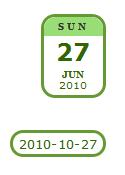
Date may be displayed in two ways, as shown in the image: if the date text is of the format Sunday, June 27, 2010 then a block is created to make the date look like it is from a desktop calendar. Any other date format is displayed as is, in a rounded border box.
Unfortunately, it is not east to insert this in Blogger templates. It requires manual editing, so the usual disclaimers apply - keep a backup, and don't do this unless you are comfortable with editing blogger templates.
Copy the JavaScript section to the head section in the blogger template. Copy the CSS section also to same place, or add it to the "Add CSS" button available under Advanced in the Blogger Template Designer.
Then, change the HTML that prints the date, the example below uses the timestamp (to show the date on every post, unlike the default blogger behavior which shows date only once, for all postings made on one date). Remove this line:
Remove that line (and any surrounding enclosures that are not needed). Where appropriate, add:
calDate('');
For example, put that just before:
or after:
Resize Nested LVM inside KVM Machines
Sat, 2009–Sep–12This was supposed to be easy - extending logical volumes. But if you install a virtual machine, then it all becomes a mess. Search the web for how to extend a partition "nested" in an LV, and there are only questions and no answers.
KVM Disk Management Issues shows an alternative to using the standard install - "just put a filesystem on it and you are done" which basically means that manual partitioning should be chosen during a Ubuntu install. Resize KVM Image shows another alternative which basically involves deleting the swap partition inside the KVM which allows the root partition to be enlarged. That would be necessary when there is no nested LVM, when the partitions were created in the hosts' logical volume. And for a general introduction to LVM see Logical Volume Management (IBM).
virt-manager makes it easy to install the virtual machine using an .iso image of the OS to install. It is not easy to resize storage on a KVM virtual machine, if installed following the standard instrutions - make a logical volume on the host machine, let the virtual machine installer use it like a raw disk to create its partitions, and install the OS.
Well, the trouble is now that the standard LVM resize procedures are not helpful. This is what the picture looks like, where VG is the host machine volume group:
Host Machine:
   vg:VG
    -- lv:kvm1
    -- lv:unused (lot of unused space on the volume group VG)
lv:kvm1 is the logical volume used to install the virtual machine. Let us say it is a Debian-based system, like Ubuntu. Using the default "Guided Partitioning", it will install a logical volume on the disk.
    -- lv:kvm1
       -- vg:VIRT
          -- lv:vroot     --- this is the partition we want to extend
-- lv:vswap Drupal is a lot of trouble
Sat, 2009–Jan–17This site uses Drupal. Drupal has turned into a nightmare. It was fine when there was a single 4.x version out there, but soon after 4.x, there was 5.x. Then 6.x. Upgrading from a older version is near impossible.
There always was the assumption that some amount of coding would be required by anyone running a Drupal site. But be prepared - you will be hacking modules left-and-right to get any thing running. At this time, one has to question whether the amount of hacking required to get things to run are worth it. Maybe all CMSes have this problem, but certainly Drupal is really a poster-child for impossible-to-ever-upgrade software.
The problem occurs because Drupal changes the API every release, adds new incompatible features, and modules and themes become unusable. And since modules and themes are merely someone's weekend project, it can be months or years before a module becomes compatible with the newer Drupal version.
Core drupal does not have image handling capabilities or spam fighting capability so even a basic site will need to use external modules. Add things like forums, automatic aliases, FAQs, it becomes a large collection of non-core modules.
The advantage of Drupal is that it is extensively customizable, and has a wide range of modules. This is exactly the same thing that makes a Drupal site near-impossible to upgrade. Once a site is up and starts to depend on a bunch of modules, rest assured that when a new Drupal version comes out quite a few required modules will not make it to that new version!
Drupal core does get upgraded without problems. But Drupal itself has become super-bloated. Web hosts that worked fine with Drupal 4.7 will not support Drupal 6.x because of heavily increased memory and CPU requirements.
Spam Email Counts
Mon, 2008–Apr–21Is email on the way out? That is probably not yet an easy question, but the amount of spam seems to be holding steady, with periodic bursts of spam email storms.
Here are some graphs of spam at one of my mailboxes. This is for a very public email address. The spam detection is using spamassassin which runs under procmail with a customized whitelist and blacklist. Over the few years I've used this, there have been only 1-2 false positives for spam (of course, detection of false positives is not easy since this requires digging through 100s of spam messages, but I have no reason to believe that false positives are more prevalent). There have been quite a few false negatives - messages that are spam, but missed by spamassassin. These are usually around 1%-10% of the total detected spam messages, which is low enough that the graphs below are still useful to show the trend of spam message counts.
2010 Spam Counts 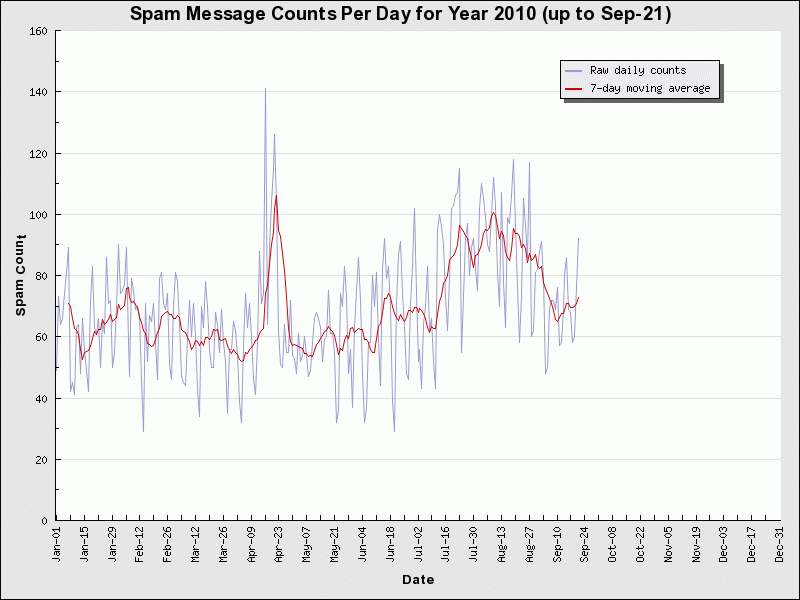
The Spam Counts images are updated periodically, usually every day, to include data of the previous complete 24-hour period.
[This image is no longer updated - the last counts will be for 2010-September. I no longer pull all email, there are only 1-3 non-spam emails and 80-100 spam messages per day. Will move all email use to one of the publicly available web sites, and have started using text chat more, and possibly move to voice chat in future too. Email is no longer very useful for home use.]
DD-WRT for Linksys wrt54g v8
Sat, 2008–Apr–12dd-wrt is third-party firmware that can be loaded on many routers and it makes available many additional features such as advanced routing as well as a keep alive mechanism. It is maintained by BrainSlayer.
In the few days of using it, some advantages of dd-wrt are evident. It has been far easier to configure on my network of Linux and Windows computers, which use both static and DHCP IP addressing. The bundled Linksys software on the new WRT54G V8 device had long DNS lookup times on the Linux computers (probably needed to use the remote DNS resolvers instead of pointing to the Linksys box), for all lookups, at all times. But instead of re-configuring the Linux boxes, in the same amount of time, it was quite easy to install dd-wrt micro-edition using these instructions: How to Flash Linksys wrt54g
Quick Links
Travel Travel reports, it is all about food
Montreal: Schwartz's, Le Petit Alep
Albums: Pictures and some notes
ITRANS Song Book Hindi, Urdu, Marathi song lyrics
Online ITRANS Web Interface
BlockHosts block hosts
BlockHosts FAQ
BlockHosts Forum
CD Inserts & Envelopes Web Interface
Nisha Ganatra's Films
Cake: starring Heather Graham
Email: avinash@aczoom.com

Recent Articles
- Multiple shops increased TV prices this weekend
- Restaurants & Food Markets - Montréal
- Grillade Farhat - Outside
- Link Filter Drupal Module
- BIXI Montreal Key and Dock
- BIXI Montreal Subscriptions for Tourists
- La Belle Province - Multiple
- La Cantine - Poutine - Closed
- Schwartz's Smoked Meat
- Absolute Bagels - 2788 Broadway, New York
- Getting Around - Montreal
- STM Tourist Card
- New York MetroCard Refill Calculator
- Import Prices Script for Quicken
- Avesta
- Montreal
- Le Club Sandwich - Closed
- L'Gros Luxe Grilled Sandwich with Poutine
- STM - Métro and Bus
- Sambar Recipe ( सांबर )
Recent blog posts
- Multiple shops increased TV prices this weekend
- Creating a static Drupal site
- Static archive as of 2014
- Phone scam artists using IRS threats!
- Floating baths in Montreal
- Notes on Clearmodem 4G Home Internet
- 6 hours layover in London Airport - Visit London City too
- Spam taking up most of the Internet bandwidth?
- Google Chromebook tips
- Turn off all phone roaming
Copyright
Copyright © 1995-2016 Avinash Chopde, avinash@aczoom.com