| ACZoom Home | ITRANS | ITRANS Song Book |
Online Interface to Itrans
Text to Unicode converter
There are cells with explanation notes in the spreadsheet. As of 2026, input codes for both ITRANS and ISO are mostly the same.
- Direct access to itrans 5.3 encoding: aczoom.com/itrans/online/
- Direct access to iso based encoding: aczoom.com/itrans/online/?tsv=iso
- Additional help and starting with specific output languages is described at the customize this package page.
- Note:
#romanis now deprecated and will be removed after 2027. Use#isoinstead. Also related are the#iastand#ipaoutputs. Examples shown here.
Examples
Visit this page for examples of most of the codes used for both itrans 5.3 and iso based codes.
Brief example itrans 5.3 encoding
Note: itrans uses a precise mapping of input codes to output code. It is not a phonetic conversion system, nor is it meant to be. (There are many other systems that do that.) Itrans is a table-driven, customizable mapping of input words to any Unicode character sequence.Enter this example text in the Enter itrans input box above:
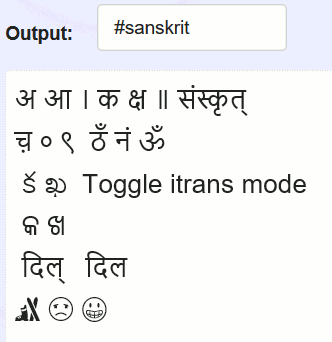
a aa | ka kSha || sa.nskRRit
cha{nukta} 0 9  Tha.N na.n OM
#telugu ka kha ## Toggle itrans mode
#oriya ka kha
#sanskrit dil  #hindi dil
{skier} {face-frown} {face-grin}
The above text shows these features:
- vowels such as
a aa, consonants such aska Kha - Unicode code points such as
{nukta} - explicit language markers such as
#telugu - schwa deletion in Hindi and corresponding sanskrit example:
dil - use of
##to toggle off/on the itrans mode. The toggle will disable itrans conversion, or use the last used language marker for itrans conversion, depending on whether it is the first ## or the second ## marker. - use of unicode names directly
{face-grin} - Visit examples of many of the codes used for both itrans 5.3 and iso based codes.
References
- ITRANS: aczoom.com/itrans was created back in 1990s and used for many docs, especially Hindi song lyrics
- All supported output scripts are shown in the drop down list for the
Outputfield in the form. Use#<script name>in the input to switch to different output. Use##to switch to English (or native language in your browser). - #iso output follows ISO 15919 (Wikipedia).
- #iast output follows International Alphabet of Sanskrit Transliteration (Wikipedia).
- #ipa output follows International Phonetic Alphabet (Wikipedia).
- All the output characters are define in the code based on data in these spreadsheets:
- itrans table.
- iso based input spreadsheet (mostly same as the itrans 5.3 table).
- In addition to loading updated conversion tables, this entire web page can be recreated and customized and hosted locally. It requires coding, and familiarity with Javascript, HTML, CSS, etc. Details are at the customize this package page.
The source code for this client-side application is available at GitHub itrans link. It has the Javascript files, as well as this HTML web page and CSS files.
Please note that no technical support is available for this web page or for the tools on this web page.
If you do find a bug (or a mapping that may be incorrect), feel free to file an issue at the
GitHub itrans issues page. Note that for extensive and private mappings,
you can create a copy and load your own spreadsheet. For even more customization for changes to the code
Javascript, HTML, CSS, see the information in customize this package page.